
The cml:shapes tag allows users to create an image annotation job for ellipses or circles in conjunction with a custom ontology and the use of test questions and aggregation.
Building a Job
The following CML contains the possible parameters for an ellipse/circle job:
<cml:shapes type="['ellipse']" source-data="{{image_url}}" name="annotation" label="Annotate this image" validates="required" ontology="true" ellipse-threshold="0.7" ellipse-agg="0.6" class-threshold="0.7" class-agg="agg" allow-ellipse-rotation="true" crosshair="true" output-format="json" allow-image-rotation="true"/>
Note: There are parameters for test questions and aggregation that apply to both the ellipses and the labels.
Parameters
Below are the parameters available for the cml:shapes tag. Some are required in the element, some are optional.
-
type-
The shape used in the job, set in an array.
-
-
source-data-
The column from your source data that contains the image URLs to be annotated.
-
-
disable_image_boundaries: allows shapes to be drawn outside the image boundary-
When
disable_image_boundaries="true"shapes can be dragged outside the image boundaries and the output will contain negative values -
The default setting for
disable_image_boundaries is "false"
-
-
name-
The results header where annotations will be stored.
-
-
label-
The question label contributors will see.
-
-
validates(optional)-
Whether or not this element is required to be answered.
-
Accepts ‘required’
-
Defaults to not required if not present
-
-
ontology(optional)-
The list of classes to be labeled in an image - view this article to learn how to create your custom ontology.
-
Accepts a boolean
-
Defaults to ‘false’ if not present
-
-
review-data(optional)-
This will read in existing annotations on an image. The format must match the output shown in the aggregation section below. All that’s needed is the following:
-
‘type’
-
‘class’ if using an ontology
-
‘coordinates'
-
'id'
-
Example:
-
[{“class”:“car”,“coordinates”:{“rx”:50,“ry":110,“x”:100,“y”:150},“type”:“ellipse”,“id”:“247f2099-22e1-4825-9bc1-3e51c6019fe0”}]
-
-
-
-
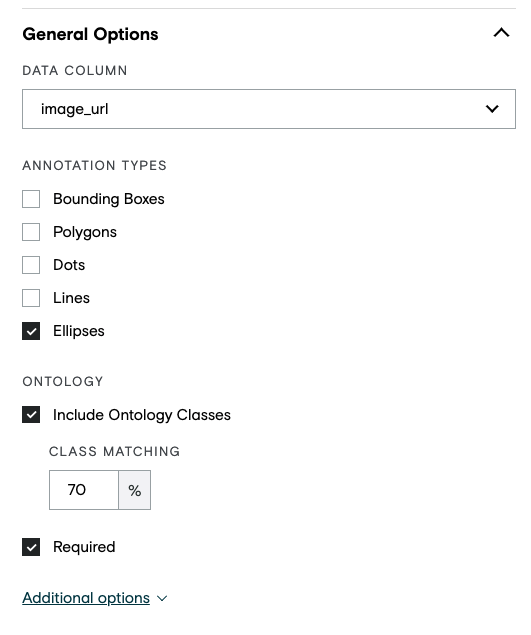
ellipse-threshold-
The minimum overall ellipse/circle IoU required for a contributor to pass a test question.
-
Accepts a decimal value between 0.1 and 0.99.
-
-
class-threshold-
The minimum percentage of correct classes applied to ellipses/circles test question for a contributor to be considered correct.
-
Accepts a decimal value between 0.1 and 0.99.
-
The formula is correct / (correct + incorrect)
-
Example: the class-threshold is set to 0.7 and a test question contains 10 ground truth shapes. A contributor gets 8 out of 10 classes correct for a score of 80% and they’re marked correct on the test question
-
-
-
ellipse-agg-
The minimum IoU required for result ellipses/circles to be clustered together.
-
Accepts a decimal between 0.1 and 0.99, or the value 'all'.
-
If 'all' is selected, no clustering is done on the ellipses/circles.
-
-
class-agg-
The aggregation applied to the class for a given cluster of shapes.
-
Accepts standard aggregation types:
-
agg -
all -
agg_x -
cagg_x
-
-
-
min-ellipse-height(optional)-
Each ellipse/circle drawn by a contributor must be at least this height in pixels
-
Accepts a positive integer - must be at least 2
-
-
max-ellipse-height(optional)-
The maximum possible height in pixels each ellipse/circle can be
-
Accepts a positive integer - must be at least 2
-
Please note: If using the Graphical Editor, moving the slider all the way to 1000+ does not set a maximum height. To set the maximum larger than 1000px, you will need to set the max-box-height in the Code Editor.
-
-
min-ellipse-width(optional)-
Each ellipse/circle drawn by a contributor must be at least this width in pixels
-
Accepts a positive integer - must be at least 2
-
-
max-ellipse-width(optional)-
The maximum possible width in pixels each ellipse/circle can be
-
Accepts a positive integer - must be at least 2
-
Please note: If using the Graphical Editor, moving the slider all the way to 1000+ does not set a maximum width. To set the maximum larger than 1000px, you will need to set the max-box-width in the Code Editor.
-
-
allow-ellipse-rotation(optional)-
Will enable contributors to rotate ellipses on the image
-
Accepts 'true' or 'false'
-
Defaults to ‘false’ if not present
-
-
crosshair(optional)-
Will enable crosshair location indication
-
Accepts 'true' or 'false'
-
Defaults to ‘false’ if not present
-
-
ellipse-aspect-ratio(optional)-
Controls the aspect ratio of the ellipse
-
The ratio is width:height
-
Setting this to 1:1 enforces a perfect circle
-
-
Accepts a ratio of integers, e.g., 2:1
-
-
output-format(optional)-
Accepts 'json' or 'url'
-
If ‘json’, the report column containing contributors' annotation data contains the annotation data in stringified JSON format. The JSON format is as follows (this is the legacy JSON format):
-
[ { "id": "4bc1ba1d-ede9-4b80-9892-95fced615441", "class": "Car", "type": "box", "coordinates": { "x": 416, "y": 243, "w": 125, "h": 95 } } ]
-
-
If ‘url’, the report column containing contributors' annotation data contains links to files. Each file contains annotation data for a single data row in JSON format. With this new output option, we have updated the JSON structure to allow inclusion of more data fields. The new JSON format is as follows:
-
-
{ ableToAnnotate: true, imageRotation: 30, annotation: [{ "id": "4bc1ba1d-ede9-4b80-9892-95fced615441", "class": "Car", "type": "box", "coordinates": { "x": 416, "y": 243, "w": 125, "h": 95 } }]}
-
-
-
In the case where the tool was unable to load the input data and the contributor was unable to annotate,
ableToAnnotatewill be set tofalse. -
Defaults to ‘json’ if attribute not present.
-
This parameter is available within the CML only; it is not yet supported in the Graphical Editor.
-
-
allow-image-rotation(optional)-
Accepts
trueorfalse -
If
true, contributors can rotate the image within the image annotation tool. Contributors click a toolbar icon to turn on a rotation slider that can be used to adjust rotation angle from 0 to 359 degrees. The degrees rotated are exported in theimageRotationfield. This feature is only compatible with export optionoutput-format=url; this attribute must be added to the job cml before launch.-
Important note: Test questions and aggregation are not currently available for this annotation mode.
-
-
If
false, contributors cannot rotate the image. -
Defaults to
falseif attribute not present.
-
-
task-type(optional)-
Please set task-type=”qa” when designing a review or QA job. This parameter needs to be used in conjunction with review-data . See this article for more details.
-
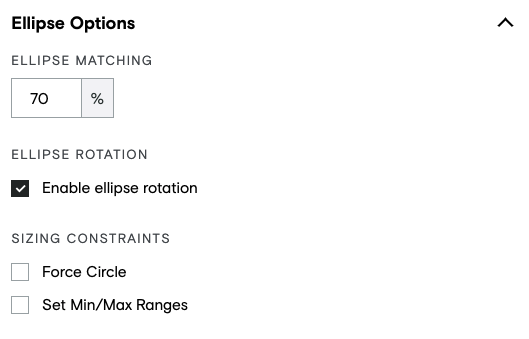
Shape Type Limiter
-
Limit which shapes can be used with certain classes
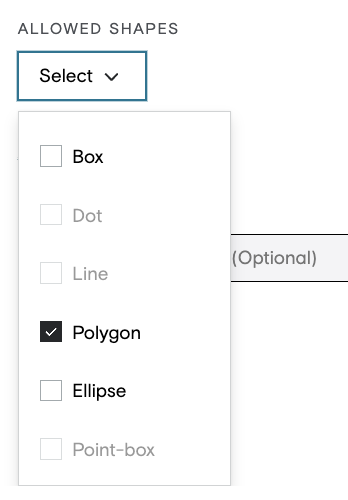
Min/Max instance quantity
-
Configure ontologies with instance limits
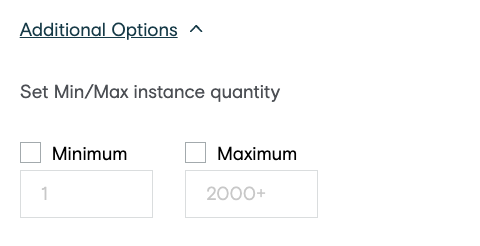
-
Comes with the ability to mark the class as not present for long tail scenarios. This information will be added to the output as well.

Customizable Hotkeys
-
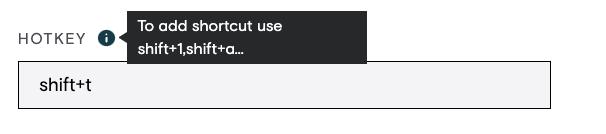
Hotkeys can be assigned to classes by the user. Hotkeys cannot conflict with any other browser or tool shortcuts.
Aggregation
Ellipses/Circles
-
Aggregation for ellipses/circles using
cml:shapesworks as follows:-
Set the
ellipse-aggparameter in the CML, which is the IoU used for clustering ellipses/circles prior to aggregation.-
For example, if the
ellipse-aggis 0.6, boxes that overlap each other by at least 60% will be clustered together.
-
-
-
The average ellipse area is then calculated by taking the average center coordinates and average X and Y radii.
-
Each of these is weighted by the contributor trust score.
-
-
The union area of all the ellipses in the cluster is calculated.
-
Finally, the average ellipse area is divided by the union area of ellipses (I / U)
-
When using rotated ellipses:
-
The calculation of the IoU (Intersection over Union) takes the degree of rotation into account as an added parameter.
-
'angle' will be returned in the output as an integer between 0 and 360, representing the clockwise degree of rotation
-
Classes/Labels
The class-agg parameter accepts the following standard aggregation methods:
-
agg -
all -
agg_x -
cagg_x
Labels (or classes) are aggregated per returned ellipse/circle. This means, for example, if you choose to aggregate boxes - as opposed to selecting 'all' - and you choose class-agg="agg", for each aggregated box you'd receive the most confident label out of the constituent boxes in the cluster. If you choose class-agg="all", you'd receive every label applied to the cluster of boxes, but still just one box, and so on. For ellipse-agg="all", you'd receive every ellipse/circle and every label in the image, no aggregation. Labels will always be grouped with the shape they were applied to and will be returned in a dictionary.
Example output of a job with box-agg="0.6" and class-agg="agg" with allow-ellipse-rotation set to 'true':
[{"average_trust":0.7857,"class":{"car":1.0},"coordinates":{"rx":50,"ry":110,"x":100,"y":150},"iou":0.9628,"type":"ellipse","angle":45}]
Example output of a job with ellipse-agg="0.6" and class-agg="all":
[{"average_trust":0.7857,"class":{"car":0.33,"person":0.33,"tree":0.33},"coordinates":{"rx":50,"ry":110,"x":100,"y":150},"iou":0.9628,"type":"ellipse"}]
Reviewing Results
To review the results of your job:
-
Go to the Data page.
-
Click on a unit ID.
-
In the sidebar of the annotation tool, select an option from the drop-down menu.
-
You’ll see different contributor IDs, which allow you to view individual annotations.
-
You’ll also see an “aggregated” option, which shows you the result you’ll get based on your aggregation settings in the CML or report options page of your job.
-